
Security
Your Mac stays in control.
Ace asks before it uses protected parts of your Mac. Your work stays local unless a task needs the AI provider or service you chose.
Signed by Apple
Every release is signed and notarized, so macOS can verify who shipped it.
Permission by permission
Microphone, screen and app control stay off until you approve them in macOS.
No Ace tracking
No Ace-owned analytics, session replay, usage telemetry or crash reporter.
What Ace can use
You approve each protected capability.
Where your data goes
Local until the task needs a connection.
The Privacy Dashboard shows what Ace keeps on this Mac and what a request sends elsewhere.
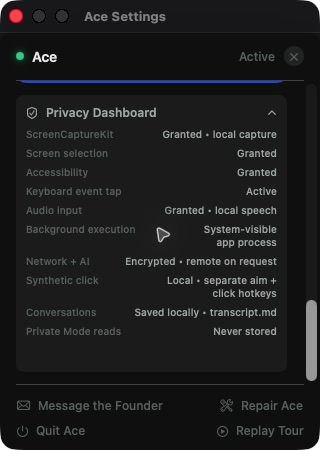
Stored on this Mac
Normal conversation turns are appended to the owner-readable transcript.md. Private Mode reads are not written. Raw microphone audio is not kept as a recording.
Sent for a task
The request and context you choose go directly to your AI provider. An approved browser, app or tool can contact the service required by that task.
Your provider's rules apply
Once a request reaches the provider you connected, that provider's data policy applies.
Verify the release
The proof is in the file.
Apple verifies every download
Ace is signed with a Developer ID, notarized by Apple, and ships with the notarization ticket attached. It opens normally through Gatekeeper.
Check the downloaded file yourself
The first command checks the exact file. The second asks macOS to verify its Apple signature.
shasum -a 256 ~/Downloads/ace.dmg6fd0691e95d3f6dd0aafb68d410322c9e13d47f108e860902d0fb6504e5ae818
spctl -a -vvv -t open --context context:primary-signature ~/Downloads/ace.dmgmacOS should report accepted and Notarized Developer ID.
Ace has not had an independent security audit. Report a problem directly to [email protected].